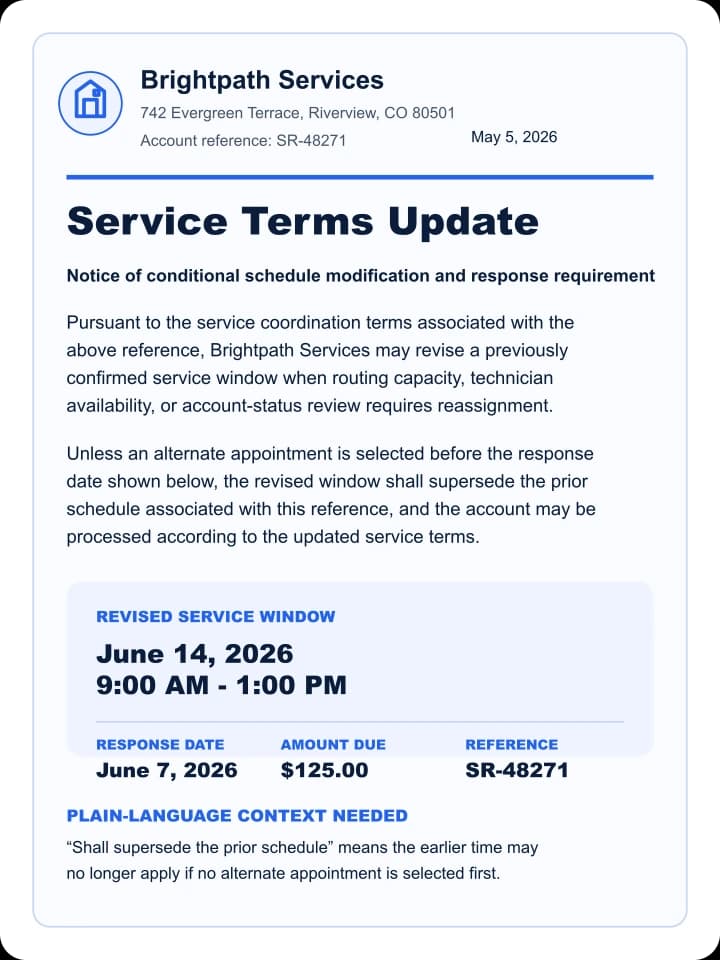
Your earlier service time may be replaced by a new window unless you choose a different appointment before June 7, 2026.
Dates and amounts
New window: June 14, 2026, 9:00 AM - 1:00 PM. Response date: June 7, 2026. Amount due: $125.00.
Helpful context
“Supersede the prior schedule” means the old appointment time may no longer apply.
Helpful for everyday documents where important details are easy to miss.
DocPlainly is built for moments when the wording is formal, unfamiliar, or spread across several sections.
Subscription renewal notice
Original wording
Auto-renews unless canceled at least 10 days before the renewal date.
Plain-language help
Renewal is coming up. The action date may be earlier than the renewal date.
Warranty claim instructions
Original wording
Proof of purchase and service records must be submitted before review.
Plain-language help
You may need receipts and service records before the claim can be reviewed.
Billing notice with fees
Original wording
Balance includes prior amount, adjustment, late fee, and current charges.
Plain-language help
The total may combine old balance, new charges, credits, and fees.
Rental addendum
Original wording
Section 4 replaces the prior access and maintenance notice terms.
Plain-language help
A newer section may change what the earlier rental agreement said.
A simple flow built around clear choices.
01
Step 1: Upload your document
Choose a clear image or PDF of the document you want explained. A smartphone photo usually works when the page is flat, readable, and fully in frame.
02
Step 2: See what matters
Get important dates, amounts, unfamiliar wording, and possible next steps pulled into a plain-language explanation.
03
Step 3: Choose what to keep
Save the explanation, ask follow-up questions, set reminders, or leave without saving. Saving is always your choice.
Paid plans add encrypted Secure History across devices, reminders, response drafts, and exports. Saving always remains your choice.
Understand the document, then verify what matters.
DocPlainly explains visible wording. It is not a substitute for a qualified professional, and AI-generated explanations should be checked against the original document before you act.
Protected while it is explained
Your upload is encrypted while it is sent for processing. DocPlainly does not save the original file. OpenAI's API creates the explanation, and API inputs are not used to train its models by default.
Saved history controls
Saving is optional. Free accounts can keep up to 3 explanations in Secure History on one device. Paid plans add more saved explanations and encrypted cloud access with either your own recovery key or DocPlainly-managed access.
Everyday documents
Use it for notices, terms, bills, letters, policies, and forms you are allowed to upload.